Showing posts with label Jailbreak. Show all posts

12.29.2013

FlipLaunch App Toggles
FlipSwitch is a framework for adding quick toggles to apps and tweaks. We explained what the framework does and how it works in this post. In fact, FlipControlCenter, a tweak that we just reviewed, uses the FlipSwitch framework to incorporate customized toggles into iOS 7′s Control Center. Needless to say, FlipSwitch is an extremely handy tool for developers, because it gets rid of the redundancy of creating shortcut toggles from scratch with every app or tweak.
A new add-on to FlipSwitch has been released called FlipLaunch. It allows users to incorporate app shortcuts directly into releases that support FlipSwitch. This means that one can easily add a shortcut to any app installed on device to any tweak or app that supports the FlipSwitch framework. And because the add-on uses a special two-letter naming system, you’re ensured that the application launch toggles will always look good and never out of place.
I’ve tested out FlipLaunch with the FlipControlCenter tweak that we just reviewed. Have a look inside to see how it works via our hands-on video walkthrough.
Once installed, you’ll see a new FlipLaunch preference panel located in the stock Settings app. The add-on’s preferences consist of nothing more than a list of apps that can be checked to enable, and unchecked to disable. Once apps are enabled, they will appear in any app that supports the FlipSwitch framework.
I tested out FlipLaunch with FlipControlCenter, a recently released tweak by Ryan Petrich. As you might have guessed by its name, FlipControlCenter is a tweak that supports the FlipSwitch framework. After enabling a few apps with FlipLaunch, the enabled apps immediately appeared as valid toggle options in FlipControlCenter’s preferences. Enabled applications will appear immediately within any and all apps designed to take advantage of the toggle framework.
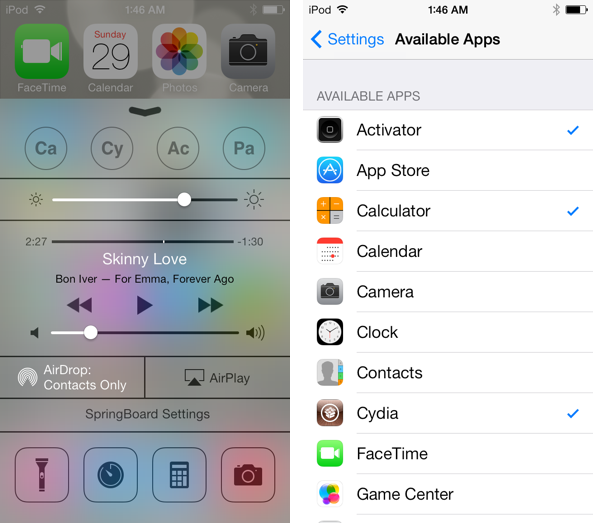
FlipLaunch Settings
All applications that you have installed on your device, whether it be stock apps like the App Store, Calculator, or Calendar, or whether it be third party applications like Cydia, or Spotify, can be enabled and used as shortcut toggles. Even better is the fact that throughout this whole processes of enabling and disabling specific tweaks from contention, there are no resprings required, and the changes take effect immediately.
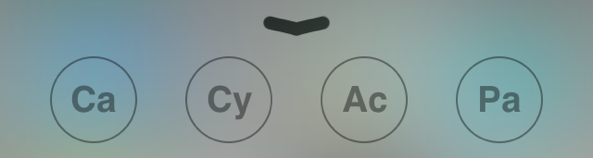
But none of that convenience would matter if the toggle buttons were poorly designed and lousy to look at. Thankfully, Jack Willis, the developer of FlipLaunch, took a smart approach. Instead of using an app’s icon, or some other generic avatar, FlipLaunch uses a stylized version of the first two letters that make up the app’s name. For instance, when you have Cydia enabled, the toggle will read: Cy. The toggles look good, and remind me of the periodic table of elements in style and design.
FlipLaunch adds a powerful new set of features to the already awesome FlipSwitch framework. If you use a tweak like FlipControlCenter, you now have a bonafide way to add additional app shortcuts directly to Control Center.
Head over to Cydia’s BigBoss repo to find FlipLaunch. It’s a free download and it’s available right now. Be sure to share your thoughts on the release in the comments down yonder.

iApps Blog

FlipLaunch App Toggles
FlipSwitch is a framework for adding quick toggles to apps and tweaks. We explained what the framework does and how it works in this post. In fact, FlipControlCenter, a tweak that we just reviewed, uses the FlipSwitch framework to incorporate customized toggles into iOS 7′s Control Center. Needless to say, FlipSwitch is an extremely handy tool for developers, because it gets rid of the redundancy of creating shortcut toggles from scratch with every app or tweak.
A new add-on to FlipSwitch has been released called FlipLaunch. It allows users to incorporate app shortcuts directly into releases that support FlipSwitch. This means that one can easily add a shortcut to any app installed on device to any tweak or app that supports the FlipSwitch framework. And because the add-on uses a special two-letter naming system, you’re ensured that the application launch toggles will always look good and never out of place.
I’ve tested out FlipLaunch with the FlipControlCenter tweak that we just reviewed. Have a look inside to see how it works via our hands-on video walkthrough.
Once installed, you’ll see a new FlipLaunch preference panel located in the stock Settings app. The add-on’s preferences consist of nothing more than a list of apps that can be checked to enable, and unchecked to disable. Once apps are enabled, they will appear in any app that supports the FlipSwitch framework.
I tested out FlipLaunch with FlipControlCenter, a recently released tweak by Ryan Petrich. As you might have guessed by its name, FlipControlCenter is a tweak that supports the FlipSwitch framework. After enabling a few apps with FlipLaunch, the enabled apps immediately appeared as valid toggle options in FlipControlCenter’s preferences. Enabled applications will appear immediately within any and all apps designed to take advantage of the toggle framework.
FlipLaunch Settings
All applications that you have installed on your device, whether it be stock apps like the App Store, Calculator, or Calendar, or whether it be third party applications like Cydia, or Spotify, can be enabled and used as shortcut toggles. Even better is the fact that throughout this whole processes of enabling and disabling specific tweaks from contention, there are no resprings required, and the changes take effect immediately.
But none of that convenience would matter if the toggle buttons were poorly designed and lousy to look at. Thankfully, Jack Willis, the developer of FlipLaunch, took a smart approach. Instead of using an app’s icon, or some other generic avatar, FlipLaunch uses a stylized version of the first two letters that make up the app’s name. For instance, when you have Cydia enabled, the toggle will read: Cy. The toggles look good, and remind me of the periodic table of elements in style and design.
FlipLaunch adds a powerful new set of features to the already awesome FlipSwitch framework. If you use a tweak like FlipControlCenter, you now have a bonafide way to add additional app shortcuts directly to Control Center.
Head over to Cydia’s BigBoss repo to find FlipLaunch. It’s a free download and it’s available right now. Be sure to share your thoughts on the release in the comments down yonder.
Mobile Substrate Cydia
Are you jailbroken on iOS 7? Are the apps and tweaks installed via Cydia not showing up on your device? If you’re running into this problem, you’re not alone. I’ve received numerous questions about this problem over the last few days; so many, that I thought it would good to make a post and video on it for those that need help.
The short answer to the question is Mobile Substrate. Most of the apps and tweaks that you install from Cydia rely on Mobile Substrate, and Mobile Substrate has not been updated for the latest iOS 7 jailbreak as of yet. An update has been promised to come soon, but Saurik, its developer, is no doubt inundated with about a thousand and one different tasks related to the just released jailbreak.
Let’s give Saurik the time he needs to get a properly updated working release of Mobile Substrate in our hands. In the meantime, if you’re running a non-64-bit device, you can take the following steps to make your favorite apps and tweaks work.
Step 1: Verify that you’re running a compatible device.
Mobile Substrate will not work properly with 64-bit devices like the iPhone 5s, iPad Air, and iPad mini with Retina Display. You’re going to need to wait on an update before tweaks and apps using Mobile Substrate will work properly. Patience, grasshoppers.
Step 2: Reinstall Mobile Substrate and Substrate Safe Mode
If you’re running a compatible device (i.e. iPhone 5, or iPod touch 5th generation) then a simple reinstall of Mobile Substrate and Substrate Safe Mode should put your back in business. You should use Cydia’s queuing feature to do both at the same time. Please watch the video above for a full step-by-step walkthrough of the process.
Substrate Install Cydia
You should now be able to use your favorite apps and tweaks. You will even be able to respring with no issues. If you reboot, however, you will need to follow Step 2 again, and reinstall Mobile Substrate and Substrate Safe Mode in order to reenable access to your installed apps and tweaks.
Keep in mind that this isn’t a guarantee fix for all of the non-working apps and tweaks installed on your device, but it will go a long way towards kickstarting your efforts. At any rate, Saurik has definitely advised against installing any so-called “Mobile Substrate fixes” available on any number of shady looking repos out there. The fixes may work, but it’s probably a good idea for you to wait and be patient, and in the meantime utilize this simple yet effective method for enabling access to your favorite Cydia releases.
Although Saurik has stated that he is hard at work on providing an update to Substrate, there is still no solid ETA. The Evad3rs’ recent 1.0.1 update to Evasi0n7 contained some hooks to support some future updates from Saurik. I’m going to go out on a limb and presume that has some

iApps Blog

Mobile Substrate Cydia
Are you jailbroken on iOS 7? Are the apps and tweaks installed via Cydia not showing up on your device? If you’re running into this problem, you’re not alone. I’ve received numerous questions about this problem over the last few days; so many, that I thought it would good to make a post and video on it for those that need help.
The short answer to the question is Mobile Substrate. Most of the apps and tweaks that you install from Cydia rely on Mobile Substrate, and Mobile Substrate has not been updated for the latest iOS 7 jailbreak as of yet. An update has been promised to come soon, but Saurik, its developer, is no doubt inundated with about a thousand and one different tasks related to the just released jailbreak.
Let’s give Saurik the time he needs to get a properly updated working release of Mobile Substrate in our hands. In the meantime, if you’re running a non-64-bit device, you can take the following steps to make your favorite apps and tweaks work.
Step 1: Verify that you’re running a compatible device.
Mobile Substrate will not work properly with 64-bit devices like the iPhone 5s, iPad Air, and iPad mini with Retina Display. You’re going to need to wait on an update before tweaks and apps using Mobile Substrate will work properly. Patience, grasshoppers.
Step 2: Reinstall Mobile Substrate and Substrate Safe Mode
If you’re running a compatible device (i.e. iPhone 5, or iPod touch 5th generation) then a simple reinstall of Mobile Substrate and Substrate Safe Mode should put your back in business. You should use Cydia’s queuing feature to do both at the same time. Please watch the video above for a full step-by-step walkthrough of the process.
Substrate Install Cydia
You should now be able to use your favorite apps and tweaks. You will even be able to respring with no issues. If you reboot, however, you will need to follow Step 2 again, and reinstall Mobile Substrate and Substrate Safe Mode in order to reenable access to your installed apps and tweaks.
Keep in mind that this isn’t a guarantee fix for all of the non-working apps and tweaks installed on your device, but it will go a long way towards kickstarting your efforts. At any rate, Saurik has definitely advised against installing any so-called “Mobile Substrate fixes” available on any number of shady looking repos out there. The fixes may work, but it’s probably a good idea for you to wait and be patient, and in the meantime utilize this simple yet effective method for enabling access to your favorite Cydia releases.
Although Saurik has stated that he is hard at work on providing an update to Substrate, there is still no solid ETA. The Evad3rs’ recent 1.0.1 update to Evasi0n7 contained some hooks to support some future updates from Saurik. I’m going to go out on a limb and presume that has some

11.15.2013

Screen Shot 2013-11-14 at 12.50.14 PM
Following this morning’s release of iOS 7.0.4, we’ve been getting many questions regarding the safety of updating to the latest software version for those who are hoping to be able to jailbreak their device one day.
The good news is that it is completely safe to update to iOS 7.0.4 as it will not hinder your chances to jailbreak, should we ever get a jailbreak for iOS 7…
The news, which was first broken by hacker iH8sn0w, has been confirmed shortly after by MuscleNerd, although his tweet was a little more obscure and still contained the advice to stay away from it.
It’s good to know we can safely update to iOS 7.0.4. Now if only there was a jailbreak for iOS 7.0.4…

iApps Blog

Screen Shot 2013-11-14 at 12.50.14 PM
Following this morning’s release of iOS 7.0.4, we’ve been getting many questions regarding the safety of updating to the latest software version for those who are hoping to be able to jailbreak their device one day.
The good news is that it is completely safe to update to iOS 7.0.4 as it will not hinder your chances to jailbreak, should we ever get a jailbreak for iOS 7…
The news, which was first broken by hacker iH8sn0w, has been confirmed shortly after by MuscleNerd, although his tweet was a little more obscure and still contained the advice to stay away from it.
It’s good to know we can safely update to iOS 7.0.4. Now if only there was a jailbreak for iOS 7.0.4…

11.05.2013

As we know , there arent new iOS7 Jailbreak news and updates since a few weeks ago.
As the hackers and developers are working on iOS 7 jailbreak , most of Jailbreak fans are waiting and almost of them cant wait more and more.


We would like to seek your kind attention to the fact that the iOS 7 Jailbreak has not been released yet , so do not follow or download fake jailbreak software. 


Secondly we want to hear from you , why are you waiting the iOS7 Jailbreak ?
And what is the most important tweak that you missed in iOS 7 ?

iApps Blog

As we know , there arent new iOS7 Jailbreak news and updates since a few weeks ago.
As the hackers and developers are working on iOS 7 jailbreak , most of Jailbreak fans are waiting and almost of them cant wait more and more.


We would like to seek your kind attention to the fact that the iOS 7 Jailbreak has not been released yet , so do not follow or download fake jailbreak software. 


Secondly we want to hear from you , why are you waiting the iOS7 Jailbreak ?
And what is the most important tweak that you missed in iOS 7 ?

10.28.2013

Unlock7 Featured
One of the biggest differences between the Lock screen in iOS 7 and the Lock screen found on previous firmware, is the way one goes about unlocking the device. Gone are the days where you had to position your finger in just the right location in order to do so.
With iOS 7, users can slide their fingers anywhere on the Lock screen to unlock, as long as the motion is from left to right. Unlock7 is a recently released jailbreak tweak that seeks to mimic this functionality for devices not running iOS 7. How does it work? Have a look at our hands-on session inside.
After installing Unlock7, I was fairly impressed with what I found. I could now slide my finger anywhere on the screen from left to right, and the Lock screen would move very similar to the way it does on iOS 7.
Unfortunately, Unlock 7 isn’t a fully encompassing tweak for those who want the complete iOS 7 Lock screen experience. Unlock7 is only for the functional part of the equation, and as such, includes no visual tweaks in order to further mimic the look of iOS 7′s Lock screen.
With that in mind, I recommend checking one of the many WinterBoard themes that closely aligns the visual style of the Lock screen with Apple’s latest and greatest firmware. You’ll definitely want to do this, because the new slide functionality doesn’t mesh well with the look of iOS 6 and below.
I should probably mention that there are no options to configure when using Unlock7, it’s totally an install and go affair. If you want to take it for a test drive, then venture over to Cydia’s ModMyi repo — yes, that’s ModMyi, not BigBoss — and download it for free today. Be sure to share your thoughts and comments about Unlock7 in the section down below.

iApps Blog

Unlock7 Featured
One of the biggest differences between the Lock screen in iOS 7 and the Lock screen found on previous firmware, is the way one goes about unlocking the device. Gone are the days where you had to position your finger in just the right location in order to do so.
With iOS 7, users can slide their fingers anywhere on the Lock screen to unlock, as long as the motion is from left to right. Unlock7 is a recently released jailbreak tweak that seeks to mimic this functionality for devices not running iOS 7. How does it work? Have a look at our hands-on session inside.
After installing Unlock7, I was fairly impressed with what I found. I could now slide my finger anywhere on the screen from left to right, and the Lock screen would move very similar to the way it does on iOS 7.
Unfortunately, Unlock 7 isn’t a fully encompassing tweak for those who want the complete iOS 7 Lock screen experience. Unlock7 is only for the functional part of the equation, and as such, includes no visual tweaks in order to further mimic the look of iOS 7′s Lock screen.
With that in mind, I recommend checking one of the many WinterBoard themes that closely aligns the visual style of the Lock screen with Apple’s latest and greatest firmware. You’ll definitely want to do this, because the new slide functionality doesn’t mesh well with the look of iOS 6 and below.
I should probably mention that there are no options to configure when using Unlock7, it’s totally an install and go affair. If you want to take it for a test drive, then venture over to Cydia’s ModMyi repo — yes, that’s ModMyi, not BigBoss — and download it for free today. Be sure to share your thoughts and comments about Unlock7 in the section down below.

10.14.2013

SevenCenter
Like every other facet of iOS, Notification Center received a significant visual overhaul in iOS 7 when compared to iOS 6 and below. Gone are the opaque linen textures in favor of a simple and clean semi-transparent overlay.
If you’re running a jailbroken iOS 6 installation, then it’s possible to gain some of Notification Center’s new visual cues. SevenCenter is a new jailbreak tweak that brings the iOS 7 Notification Center experience to iOS 6, and iOS 5 devices. Have a look inside to see what I mean.
Once installed, there are no options to configure or settings to change, just install it and go; SevenCenter begins working immediately after installation.
The changes aren’t massive, but as you can see from the screenshot comparison at the top of the page, it’s a noticeable departure from the real life textures present in lesser firmware. All functionality remains identical as before, but the look mimics the cleaner style present in iOS 7.
SevenCenter is a free download via Cydia’s BigBoss repo. Its developer, Jonas Gessner, has created other tweaks like ProTube in the past. Be sure to share your thoughts on SevenCenter in the comments below.

iApps Blog

SevenCenter
Like every other facet of iOS, Notification Center received a significant visual overhaul in iOS 7 when compared to iOS 6 and below. Gone are the opaque linen textures in favor of a simple and clean semi-transparent overlay.
If you’re running a jailbroken iOS 6 installation, then it’s possible to gain some of Notification Center’s new visual cues. SevenCenter is a new jailbreak tweak that brings the iOS 7 Notification Center experience to iOS 6, and iOS 5 devices. Have a look inside to see what I mean.
Once installed, there are no options to configure or settings to change, just install it and go; SevenCenter begins working immediately after installation.
The changes aren’t massive, but as you can see from the screenshot comparison at the top of the page, it’s a noticeable departure from the real life textures present in lesser firmware. All functionality remains identical as before, but the look mimics the cleaner style present in iOS 7.
SevenCenter is a free download via Cydia’s BigBoss repo. Its developer, Jonas Gessner, has created other tweaks like ProTube in the past. Be sure to share your thoughts on SevenCenter in the comments below.

10.10.2013

SideSettings
SideSettings is a recently released tweak that lets you open up the settings for any app as a sidebar. Instead of having to exit the app, go to the Settings app, and access the app’s preferences, SideSettings immediately takes you to the settings of whatever app you have open using a simple swipe gesture.
Of course, all apps don’t have preferences to configure. In cases such as these, SideSettings will open up the stock Settings app instead.
I really enjoy SideSettings based on its originality alone. It’s a must see tweak that you have to witness on video to appreciate its ingenuity. Have a look at our full video walkthrough inside.
SideSettings itself doesn’t contain a preference panel for configuration, as all setup is performed using Activator. The default gesture to invoke side settings is a two finger slide in gesture from the left, but that can be reassigned to use any Activator gesture of your choosing.
The premise behind SideSettings is awesome, but as you’ll see from the video, some of the animations are a little jarring and uneven. If the developer can clean up the tweak’s animations, then I’d be able to unequivocally recommend SideSettings. Even still, I recommend the tweak on the basis of its originality alone.
What do you think about SideSettings? If you want to try it out, you can download it for $1.99 on Cydia’s BigBoss repo. Be sure to share your comments down below.

iApps Blog

SideSettings
SideSettings is a recently released tweak that lets you open up the settings for any app as a sidebar. Instead of having to exit the app, go to the Settings app, and access the app’s preferences, SideSettings immediately takes you to the settings of whatever app you have open using a simple swipe gesture.
Of course, all apps don’t have preferences to configure. In cases such as these, SideSettings will open up the stock Settings app instead.
I really enjoy SideSettings based on its originality alone. It’s a must see tweak that you have to witness on video to appreciate its ingenuity. Have a look at our full video walkthrough inside.
SideSettings itself doesn’t contain a preference panel for configuration, as all setup is performed using Activator. The default gesture to invoke side settings is a two finger slide in gesture from the left, but that can be reassigned to use any Activator gesture of your choosing.
The premise behind SideSettings is awesome, but as you’ll see from the video, some of the animations are a little jarring and uneven. If the developer can clean up the tweak’s animations, then I’d be able to unequivocally recommend SideSettings. Even still, I recommend the tweak on the basis of its originality alone.
What do you think about SideSettings? If you want to try it out, you can download it for $1.99 on Cydia’s BigBoss repo. Be sure to share your comments down below.

10.08.2013

jailbroken iphone 4s
Good news for folks who stuck around on iOS 6.1.3/4 in hopes of scoring an early jailbreak, developer winocm has confirmed that a public release for his late-version iOS 6 hack will be available in the next few months.
Winocm has been working on an iOS 6.1.3/4 jailbreak for a few months now. He’s shown it off on video, and even let our very own Jeff take it for a spin. And today he answered the oft-asked ETA question: ‘before 2014.’
Here’s the series of tweets we’re referring to:

The developer completes the announcement by asking folks to “Please be patient,” saying “we are all trying to get things done as soon as possible.” And he has since retweeted a couple of users telling him to take his time.
And it’s a good thing winocm is making sure they get things right. Any Restore-inducing flaw in his hack would essentially be jailbreak-fatal, as users would be forced to update to iOS 7 and there’s no way to downgrade.
On that note, the evad3rs have said that they are making progress on the iOS 7 jailbreak, but no ETA (or estimated time of arrival) has been given on that front. Stay tuned.
- See more at: http://www.idownloadblog.com/2013/10/07/winocm-6-1-3-4-jailbreak-2013/#sthash.sUoUMjoX.dpuf

iApps Blog

jailbroken iphone 4s
Good news for folks who stuck around on iOS 6.1.3/4 in hopes of scoring an early jailbreak, developer winocm has confirmed that a public release for his late-version iOS 6 hack will be available in the next few months.
Winocm has been working on an iOS 6.1.3/4 jailbreak for a few months now. He’s shown it off on video, and even let our very own Jeff take it for a spin. And today he answered the oft-asked ETA question: ‘before 2014.’
Here’s the series of tweets we’re referring to:

The developer completes the announcement by asking folks to “Please be patient,” saying “we are all trying to get things done as soon as possible.” And he has since retweeted a couple of users telling him to take his time.
And it’s a good thing winocm is making sure they get things right. Any Restore-inducing flaw in his hack would essentially be jailbreak-fatal, as users would be forced to update to iOS 7 and there’s no way to downgrade.
On that note, the evad3rs have said that they are making progress on the iOS 7 jailbreak, but no ETA (or estimated time of arrival) has been given on that front. Stay tuned.
- See more at: http://www.idownloadblog.com/2013/10/07/winocm-6-1-3-4-jailbreak-2013/#sthash.sUoUMjoX.dpuf

9.13.2013

Good news on the jailbreak front this evening, as pod2g has just tweeted out that he is becoming “more and more confident about an iOS 7 public jailbreak.” He’s careful to note, however, that this doesn’t mean one is coming soon.
Still, this is a great vote of confidence from pod2g, as there has been little said about the state of the iOS 7 jailbreak since word got out last week that the evad3rs were looking into it. Well, planetbeing provided a minor update on Wednesday…
Here’s the tweet:

iOS 7 has yet to receive the public jailbreak treatment, even though developer versions of the software have been floating around for nearly three months. Last year there was a tethered iOS 6 jailbreak available throughout its beta process.
But nevertheless, it’s good to know the evad3rs are on it. The team—which is made up of pod2g, MuscleNerd, planetbeing and pimskeks—was responsible for the public iOS 6 jailbreak, which was responsible for hacking over 20 million devices.

iApps Blog

Good news on the jailbreak front this evening, as pod2g has just tweeted out that he is becoming “more and more confident about an iOS 7 public jailbreak.” He’s careful to note, however, that this doesn’t mean one is coming soon.
Still, this is a great vote of confidence from pod2g, as there has been little said about the state of the iOS 7 jailbreak since word got out last week that the evad3rs were looking into it. Well, planetbeing provided a minor update on Wednesday…
Here’s the tweet:

iOS 7 has yet to receive the public jailbreak treatment, even though developer versions of the software have been floating around for nearly three months. Last year there was a tethered iOS 6 jailbreak available throughout its beta process.
But nevertheless, it’s good to know the evad3rs are on it. The team—which is made up of pod2g, MuscleNerd, planetbeing and pimskeks—was responsible for the public iOS 6 jailbreak, which was responsible for hacking over 20 million devices.

9.08.2013

Anemo — the quick reply tweak that we previewed some time back — is now available on Cydia. It’s been a long time coming, but for those of you desperate for a simple quick reply solution, the wait was well worth it.
Instead of a full fledged Message app replacement, Anemo take a more anemic approach. Using existing banner notifications, it provides a simple, yet extremely handy quick reply solution for jailbroken iOS users.
Some may consider Anemo to be a bit steep in price ($2.99 on Cydia’s BigBoss repo) for what little it does at the moment. You should probably keep in mind that A3tweaks — the team behind the release — promises to provide updates to flesh out the tweak.
In fact, the 1.0 release will bring a quick compose sheet, quick reply via Lock screen and Notification Center, and many other additional features. The team behind Anemo is looking to take a MiniPlayer approach, in that they will release loads of incremental updates over time to provide lasting value.
But make no mistake — Anemo, even in its current form, is a great tool for heavy text message users. For those who have yet to go with a Messages app replacement, Anemo is a release that’s sure to please. It has the looks, the stability, and the outright practicality to make your $2.99 money well spent.

iApps Blog

Anemo — the quick reply tweak that we previewed some time back — is now available on Cydia. It’s been a long time coming, but for those of you desperate for a simple quick reply solution, the wait was well worth it.
Instead of a full fledged Message app replacement, Anemo take a more anemic approach. Using existing banner notifications, it provides a simple, yet extremely handy quick reply solution for jailbroken iOS users.
Some may consider Anemo to be a bit steep in price ($2.99 on Cydia’s BigBoss repo) for what little it does at the moment. You should probably keep in mind that A3tweaks — the team behind the release — promises to provide updates to flesh out the tweak.
In fact, the 1.0 release will bring a quick compose sheet, quick reply via Lock screen and Notification Center, and many other additional features. The team behind Anemo is looking to take a MiniPlayer approach, in that they will release loads of incremental updates over time to provide lasting value.
But make no mistake — Anemo, even in its current form, is a great tool for heavy text message users. For those who have yet to go with a Messages app replacement, Anemo is a release that’s sure to please. It has the looks, the stability, and the outright practicality to make your $2.99 money well spent.

9.07.2013

September 10 Apple is expected to release iOS 7 to the public, it will mark the largest and most radical update in the platform's history.. Those who have already used iOS 7 know that iOS 7 contains a lot of new features and also the software’s UI has been rebuilt from the ground up, bringing about new colors, fonts and other elements.
And while most people—at least those who have seen it—seem to be ok with the changes, others are counting on an iOS 7 jailbreak to get rid of the makeover. But that may be easier said than done, because according to Saurik, the future looks bleak for theming…

Today it looks like that Winterboard, the most popular theming tool will not work on iOS 7... In a recent comment on a Reddit thread, Saurik (who created and maintains WinterBoard) painted a grim picture for the utility’s future, explaining that it’s very unlikely that WB will support iOS 7.
“At this time, given that WinterBoard recieved no third-party help during all of iOS 6, I have very little hope in being able to support iOS 7. I need other people to tell me what to do to the engine: I am not a theme artist, I am just one of the few developers sympathetic to the needs of theme artists.
However, I operate in a vacuum: theme artists don’t talk to me, and when they do they almost never talk about WinterBoard’s theme engine: instead, they complain about how their theme isn’t getting enough exposure in Cydia, or about some UI element. The closest was king_of_hill in April, but almost everything he wanted were complex feature requests (and the key ones were already taken care of by “use Cydget instead of WinterBoard to do what you are doing: WinterBoard isn’t designed for that”).
What I need are concrete bug reports (with screenshots and exact filenames) and core theming help (such as information on artwork files, or “car files”, at the level of the loader). If iOS 7 is even themable at all, and assuming WinterBoard can’t already theme parts of it, it is likely that WinterBoard will never manage to support those components as I doubt seriously that after four years theme artists will start taking the engine seriously.”
If Winterboard will not support iOS 7, it will have a huge ramifications for the theming scene. Sure, there are other utilities out there, like DreamBoard. But keep in mind that many high profile theme designers, including Surenix, still use WinterBoard.
It’s important to note that Saurik’s decision isn’t final, and it’s very possible that theme artists will answer his proverbial call to arms and all will end well. But this does bring up an interesting point: as different as iOS 7 is from its predecessors, there’s a good chance that a lot of our favorite jailbreak apps and tweaks aren't going to work initially—if at all—once the jailbreak hits.

Now, with all of this in mind, who’s still planning on upgrading to iOS 7 when it becomes available later this month?

iApps Blog

September 10 Apple is expected to release iOS 7 to the public, it will mark the largest and most radical update in the platform's history.. Those who have already used iOS 7 know that iOS 7 contains a lot of new features and also the software’s UI has been rebuilt from the ground up, bringing about new colors, fonts and other elements.
And while most people—at least those who have seen it—seem to be ok with the changes, others are counting on an iOS 7 jailbreak to get rid of the makeover. But that may be easier said than done, because according to Saurik, the future looks bleak for theming…

Today it looks like that Winterboard, the most popular theming tool will not work on iOS 7... In a recent comment on a Reddit thread, Saurik (who created and maintains WinterBoard) painted a grim picture for the utility’s future, explaining that it’s very unlikely that WB will support iOS 7.
“At this time, given that WinterBoard recieved no third-party help during all of iOS 6, I have very little hope in being able to support iOS 7. I need other people to tell me what to do to the engine: I am not a theme artist, I am just one of the few developers sympathetic to the needs of theme artists.
However, I operate in a vacuum: theme artists don’t talk to me, and when they do they almost never talk about WinterBoard’s theme engine: instead, they complain about how their theme isn’t getting enough exposure in Cydia, or about some UI element. The closest was king_of_hill in April, but almost everything he wanted were complex feature requests (and the key ones were already taken care of by “use Cydget instead of WinterBoard to do what you are doing: WinterBoard isn’t designed for that”).
What I need are concrete bug reports (with screenshots and exact filenames) and core theming help (such as information on artwork files, or “car files”, at the level of the loader). If iOS 7 is even themable at all, and assuming WinterBoard can’t already theme parts of it, it is likely that WinterBoard will never manage to support those components as I doubt seriously that after four years theme artists will start taking the engine seriously.”
If Winterboard will not support iOS 7, it will have a huge ramifications for the theming scene. Sure, there are other utilities out there, like DreamBoard. But keep in mind that many high profile theme designers, including Surenix, still use WinterBoard.
It’s important to note that Saurik’s decision isn’t final, and it’s very possible that theme artists will answer his proverbial call to arms and all will end well. But this does bring up an interesting point: as different as iOS 7 is from its predecessors, there’s a good chance that a lot of our favorite jailbreak apps and tweaks aren't going to work initially—if at all—once the jailbreak hits.

Now, with all of this in mind, who’s still planning on upgrading to iOS 7 when it becomes available later this month?

9.03.2013

Developer @winocm has been pretty vocal as of late about his intentions to eventually release a jailbreak for iOS 6.1.3 and iOS 6.1.4 devices. Although we generally take such claims with a heaping helping on my favorite seasoning, winocm is, from what I’ve been able to gather, a respectable member of the jailbreak community.
After all, this is the same developer that worked on an iOS 6.x downgrade, the jailbreak tweak Accentify, and has had various other contributions to the community. Needless to say, when he announced that he had an untether binary that still needed a bit of work, my ears perked up.
A few days ago, winocm reached out to iDB about his progress on the jailbreak. Although the project is still knee deep in its development phase, he did allow us to go hands on with some of his work. Today, with the help of winocm, I was able to install Cydia on my iPhone 4S running 6.1.3. If we’re ever going to see a proper tool released for the iOS 6.1.3 jailbreak, he just could be the developer to do so.
Yes, we have video of Cydia running on my iPhone 4S, and yes it’s legit. Although he has asked us not to speak about the process involved in getting a working Cydia on my 4S, I was there and watched him perform the process from start to finish. In other words, I can vouch for the Cydia install, and I can certainly vouch for video’s legitimacy. Have a look…
With that being said, the verdict is still out as to whether this will result in an actual release that everyone can take advantage of. Although winocm seems bent on accomplishing just that, releasing a working jailbreak to the masses isn’t exactly a cakewalk.
That considered, although I sat and watch as my normal boring iPhone 4S was transformed into one capable of running themes, tweaks, and jailbreak apps, I have to be honest and say that I’m still a bit skeptical about whether or not this thing will ever see the light of day.
It’s a good start, but that’s coming from a lay person who’s intelligence when it comes to this stuff reaches a plateau fairly early in the game. Winocm is a ridiculously smart individual, so I wouldn’t be surprised if he did eventually release something to the public. I just wouldn’t be surprised if he didn’t, either.
With iOS 7 on the horizon, I’ve heard a lot of folks talk about the usefulness, or lack thereof, of a iOS 6.x jailbreak this late in the game. I still think an iOS 6.1.3 jailbreak would be mighty useful, and tons of people would be happy to have a jailbreak for their 6.1.3 devices. What about you? Would you be happy to have it?
We’ll be sure to discuss all of this on our upcoming episode of Let’s Talk Jailbreak. The episode may be a little bit behind because of circumstances beyond our control, but it’s coming nonetheless.

iApps Blog

Developer @winocm has been pretty vocal as of late about his intentions to eventually release a jailbreak for iOS 6.1.3 and iOS 6.1.4 devices. Although we generally take such claims with a heaping helping on my favorite seasoning, winocm is, from what I’ve been able to gather, a respectable member of the jailbreak community.
After all, this is the same developer that worked on an iOS 6.x downgrade, the jailbreak tweak Accentify, and has had various other contributions to the community. Needless to say, when he announced that he had an untether binary that still needed a bit of work, my ears perked up.
A few days ago, winocm reached out to iDB about his progress on the jailbreak. Although the project is still knee deep in its development phase, he did allow us to go hands on with some of his work. Today, with the help of winocm, I was able to install Cydia on my iPhone 4S running 6.1.3. If we’re ever going to see a proper tool released for the iOS 6.1.3 jailbreak, he just could be the developer to do so.
Yes, we have video of Cydia running on my iPhone 4S, and yes it’s legit. Although he has asked us not to speak about the process involved in getting a working Cydia on my 4S, I was there and watched him perform the process from start to finish. In other words, I can vouch for the Cydia install, and I can certainly vouch for video’s legitimacy. Have a look…
With that being said, the verdict is still out as to whether this will result in an actual release that everyone can take advantage of. Although winocm seems bent on accomplishing just that, releasing a working jailbreak to the masses isn’t exactly a cakewalk.
That considered, although I sat and watch as my normal boring iPhone 4S was transformed into one capable of running themes, tweaks, and jailbreak apps, I have to be honest and say that I’m still a bit skeptical about whether or not this thing will ever see the light of day.
It’s a good start, but that’s coming from a lay person who’s intelligence when it comes to this stuff reaches a plateau fairly early in the game. Winocm is a ridiculously smart individual, so I wouldn’t be surprised if he did eventually release something to the public. I just wouldn’t be surprised if he didn’t, either.
With iOS 7 on the horizon, I’ve heard a lot of folks talk about the usefulness, or lack thereof, of a iOS 6.x jailbreak this late in the game. I still think an iOS 6.1.3 jailbreak would be mighty useful, and tons of people would be happy to have a jailbreak for their 6.1.3 devices. What about you? Would you be happy to have it?
We’ll be sure to discuss all of this on our upcoming episode of Let’s Talk Jailbreak. The episode may be a little bit behind because of circumstances beyond our control, but it’s coming nonetheless.

8.27.2013

A new tweak from Auxo co-creator Jack Willis recently hit the Cydia store, and it fixes an issue that likely plagues more than a few iPhone photographers. CamBright is the name of the tweak, and it forces the iPhone’s screen brightness up to 100% whenever the stock Camera app is launched.
The tweak is great for those of you who don’t walk around all day with 100% brightness on your iPhone, but who like to have the full brightness whenever snapping photos or video. Have a look at our video that showcases how CamBright works.
Although our video doesn’t show it, CamBright will reset your brightness setting back to how it was before once you exit the Camera app and Lock your iPhone. I lamented a bit in the video about the lack of a reset feature, but it turns out that you have to lock the device along with exiting the Camera app to make it work as it should.
I should also mention that Jack wasn’t alone when he created CamBright. The tweak was co-created by s1rex, better known as Bradley Friedman. Bradely has plenty of jailbreak tweaks under his belt as well, including SimpleBanners, PersistantAssistant, and BookLock.
Free on Cydia’s BigBoss repo, CamBright has no options or settings that you must configure after installing it. It’s a very simple jailbreak tweak, but it solves an annoying problem that many of you have probably encountered in the past. Be sure to share your feelings about CamBright in our comments below.

iApps Blog

A new tweak from Auxo co-creator Jack Willis recently hit the Cydia store, and it fixes an issue that likely plagues more than a few iPhone photographers. CamBright is the name of the tweak, and it forces the iPhone’s screen brightness up to 100% whenever the stock Camera app is launched.
The tweak is great for those of you who don’t walk around all day with 100% brightness on your iPhone, but who like to have the full brightness whenever snapping photos or video. Have a look at our video that showcases how CamBright works.
Although our video doesn’t show it, CamBright will reset your brightness setting back to how it was before once you exit the Camera app and Lock your iPhone. I lamented a bit in the video about the lack of a reset feature, but it turns out that you have to lock the device along with exiting the Camera app to make it work as it should.
I should also mention that Jack wasn’t alone when he created CamBright. The tweak was co-created by s1rex, better known as Bradley Friedman. Bradely has plenty of jailbreak tweaks under his belt as well, including SimpleBanners, PersistantAssistant, and BookLock.
Free on Cydia’s BigBoss repo, CamBright has no options or settings that you must configure after installing it. It’s a very simple jailbreak tweak, but it solves an annoying problem that many of you have probably encountered in the past. Be sure to share your feelings about CamBright in our comments below.

NetworkList is a recently released jailbreak tweak that allows you to keep a running list of the Wi-Fi networks known to your device. This list makes it easy to remember the Wi-Fi network names, and you can even use a tap gesture to copy the SSID or the password (which is shown in the clear) to your pasteboard.
Some may balk at the potential security concerns, but if that’s not something you worry about, NetworkList may be worth your time. Have a look at our video walkthrough past the break for more information.

iApps Blog


NetworkList is a recently released jailbreak tweak that allows you to keep a running list of the Wi-Fi networks known to your device. This list makes it easy to remember the Wi-Fi network names, and you can even use a tap gesture to copy the SSID or the password (which is shown in the clear) to your pasteboard.
Some may balk at the potential security concerns, but if that’s not something you worry about, NetworkList may be worth your time. Have a look at our video walkthrough past the break for more information.

8.26.2013

Jay Saurik WWJC
This weekend at WWJC, Saurik talked law.. and a LOT of it. While a lot of what he was talking about seemed as if it was legal mumbo-jumbo, this is what I personally got out of it.
The DMCA wants to lock down what we have rights to, such as unlocking, repairing or modifying out electronic devices. Although, there have been exemptions for the jailbreaking of “telephones”. While that’s all good and dandy, what about devices that aren’t telephones? The iPad, iPod Touch or Apple TV would not be included in any of these.

iApps Blog

Jay Saurik WWJC
This weekend at WWJC, Saurik talked law.. and a LOT of it. While a lot of what he was talking about seemed as if it was legal mumbo-jumbo, this is what I personally got out of it.
The DMCA wants to lock down what we have rights to, such as unlocking, repairing or modifying out electronic devices. Although, there have been exemptions for the jailbreaking of “telephones”. While that’s all good and dandy, what about devices that aren’t telephones? The iPad, iPod Touch or Apple TV would not be included in any of these.

8.25.2013

jailbreak-iOS-7-1Hacker Joshua Hill, also known as P0sixninja, officially presented OpenJailbreak – repository open-source components for jailbreak. The project was presented at the WWJC conference, which took place this weekend in New York.
Speaking at WWJC, Hill shared his point of view on how to jailbreak. According to him, there are five types of people jailbreaking into i-devices: beginners, fans, developers, security experts and  jailbreak creators. The OpenJailbreak project is designed for three types of users .

iApps Blog

jailbreak-iOS-7-1Hacker Joshua Hill, also known as P0sixninja, officially presented OpenJailbreak – repository open-source components for jailbreak. The project was presented at the WWJC conference, which took place this weekend in New York.
Speaking at WWJC, Hill shared his point of view on how to jailbreak. According to him, there are five types of people jailbreaking into i-devices: beginners, fans, developers, security experts and  jailbreak creators. The OpenJailbreak project is designed for three types of users .

It’s hard to believe that it’s been over two years since Ryan Petrich launched the original TweakWeek initiative, but just like the old saying goes, time flies when you’re having fun. At this year’s World Wide Jailbreak Conference, better known as WWJC or JailbreakCon, Petrich proposed a brand new TweakWeek installment, aptly dubbed TweakWeek 2.
For those of you unfamiliar with the concept, TweakWeek was an initiative that called for participating developers to release one open source tweak every day of the week. The original TweakWeek saw loads of community participation, and we got some pretty interesting tweaks as a result. TweakWeek 2 looks to continue the trend, and there are already quite a few developers on board.

iApps Blog


It’s hard to believe that it’s been over two years since Ryan Petrich launched the original TweakWeek initiative, but just like the old saying goes, time flies when you’re having fun. At this year’s World Wide Jailbreak Conference, better known as WWJC or JailbreakCon, Petrich proposed a brand new TweakWeek installment, aptly dubbed TweakWeek 2.
For those of you unfamiliar with the concept, TweakWeek was an initiative that called for participating developers to release one open source tweak every day of the week. The original TweakWeek saw loads of community participation, and we got some pretty interesting tweaks as a result. TweakWeek 2 looks to continue the trend, and there are already quite a few developers on board.
Adam Bell WWJC
Adam Bell started jailbreaking during the iOS 1.x.x days, and loved the concept of how iOS devices could be jailbroken. He started by making a replacement for music app, since he was pretty annoyed with it.
Since then, he has created Stride, Cascade, PostOffice, and other great tweaks that you see in Cydia Store today. One of his tweaks, MessageBox, ‘removed’ Chat Heads from Facebook chat and overlaid into the Springboard and over other applications. To get this application to work, he used XPC framework and CyCript. BackBoard was also used to allow Chat Heads to stay open without the launch daemon ‘Watchdog’ killing backgrounded applications. 

iApps Blog

Adam Bell WWJC
Adam Bell started jailbreaking during the iOS 1.x.x days, and loved the concept of how iOS devices could be jailbroken. He started by making a replacement for music app, since he was pretty annoyed with it.
Since then, he has created Stride, Cascade, PostOffice, and other great tweaks that you see in Cydia Store today. One of his tweaks, MessageBox, ‘removed’ Chat Heads from Facebook chat and overlaid into the Springboard and over other applications. To get this application to work, he used XPC framework and CyCript. BackBoard was also used to allow Chat Heads to stay open without the launch daemon ‘Watchdog’ killing backgrounded applications. 

8.24.2013


Yep, you read correctly. There’s a new jailbreak theme available in Cydia, and it’s based on Microsoft’s iconic Paint application.
Paint, known for its tendency to produce crude looking drawings, is the application that’s been around in one form or another since Window’s inception. When wielded by a skilled artist it can produce impressive creations, but nine times out of ten, the results end up looking like something a toddler put together. This theme is no exception.

iApps Blog


Yep, you read correctly. There’s a new jailbreak theme available in Cydia, and it’s based on Microsoft’s iconic Paint application.
Paint, known for its tendency to produce crude looking drawings, is the application that’s been around in one form or another since Window’s inception. When wielded by a skilled artist it can produce impressive creations, but nine times out of ten, the results end up looking like something a toddler put together. This theme is no exception.
All iPhone users are waiting for Apple's WWDC 2013 (World Wide Developers Conference) where the company will introduce iOS 7 the new software for all Apple device and of course a new OS X for Mac devices.... And right now we don't now a lot of things about iOS 7 and how woud it looks like, what will it feature, too many questions and a fewer answers.. But today we've got for you a seven features that we could see then in iOS 7 and they are all from different jailbreak tweaks...

iApps Blog

All iPhone users are waiting for Apple's WWDC 2013 (World Wide Developers Conference) where the company will introduce iOS 7 the new software for all Apple device and of course a new OS X for Mac devices.... And right now we don't now a lot of things about iOS 7 and how woud it looks like, what will it feature, too many questions and a fewer answers.. But today we've got for you a seven features that we could see then in iOS 7 and they are all from different jailbreak tweaks...